Showing posts with label affiliate links. Show all posts

Monday, 21 November 2016

Are you getting affiliate fees on your royalties?

If you are selling books at Amazon you are probably getting a 35% or 70% royalty on your sales. If you sell those books at Smashwords your royalty will probably be 70.5%. You could be getting 39 - 43.5% or 74 - 78.5% at Amazon though and vastly increased sales at Smashwords. The trick is to take advantage of affiliate payments which can offer you anything from 4% to 70% of the price of an e-book.

Let's deal with the better known (but less profitable) one first:

Amazon 'associates' (affiliates)

You must have a web presence acceptable to Amazon to be accepted as an affiliate. By a 'web presence' that means a website or blog with substantial traffic. You'll probably need to register for affiliate accounts at .com, .co.uk, .ca etc. Australia doesn't seem to offer affiliate services. This means you'll get multiple affiliate tags making setting up links tricky (but not impossible). Amazon's affiliate agreement is a model of obscurity and makes it difficult to understand if a .com affiliate link used by a .co.uk customer will earn an affiliate payment. You can get affiliate payments for virtually all Amazon products other than free products. Amazon depreciate adding affiliate tags to free e-books and warn that doing so may cost you all your affiliate fees if you exceed 80% of links being to free products AND 20,000 free products are ordered using one of your links - unlikely for most people. You won't earn anything on your links to free products but if a customer goes on to view and purchase other items at Amazon, you'll get affiliate payments for those.
Fees are listed at https://affiliate-program.amazon.com/gp/associates/help/operating/advertisingfees
At a minimum, assuming you make less than six affiliate sales per month you'll get 4% for e-books and other digital products
$0.99 - 4¢
$2.99 - 12¢
$3.99 - 16¢
Fees rise to up to 8.5% for 3,131 affiliate sales per month. If you managed to sell 3,131 99¢ ebooks in a month you would earn $263.47 from those sales.
Payments are made 60 days after the end of each month and can be by direct bank deposit, check or gift certificate. Affiliate payments are taken from Amazon't share of the purchase price, not the author's.
Amazon provide a toolbar for affiliates which allows you to quickly generate links and promote to social media.
Download series book 1, Immortality Gene, FREE now


Smashwords affiliate fees

Smashwords offers affiliate payments of 11% to 80.5% of the retail price of e-books. The actual percentage offered is determined by the author. The default is 11%. Anyone age 18+ with a Smashwords account is eligable to enroll.
Smashwords encourages the use of affiliate tags on free e-books and the author's own e-book links. You won't earn anything on those e-books but if a customer goes on to view and purchase other items at Smashwords, you'll get affiliate payments for those.
Affiliate fees come from the author's royalties. The author can choose not to offer affiliate payments. If an author elects to not offer an affiliate program for a book then the author's royalty is 85%.
Affiliate links are easy to create. My preferred method is to append the ?ref=[yourScreenName] code to links where [yourScreenName] is the bit after https://www.smashwords.com/profile/view/ on your 'My Smashwords page' at https://www.smashwords.com/profile
Assuming you make those 3,131 affiliate sales of an 11% 99¢ ebook you would earn $340.97 at Smashwords.
Smashwords affiliate agreement is much easier to understand than Amazon's Check it out at https://www.smashwords.com/about/smashwords_affiliate_documentation

Want to earn at Smashwords? All my e-books there offer a 35% royalty. They are visible at https://www.smashwords.com/profile/view/JChapman/authors#published?ref=JChapman If you want to use that link then just replace the 'JChapman' at the end with your screen name. If you manage to sell Amazon's 3,131 books we'll both earn  a minimum of $3,298.51

Tuesday, 18 March 2014

Using SmartURL to promote your book

It's a pain to have to change an Amazon URL to make it work in a different country. Several link shortening services offer a single link which will take the user to Amazon's site in their country. SmartURL seems the pick of the bunch for authors.

Advantages

  • A single, easy-to-remember link to your book at Amazon which works in all countries.
  • Earn an extra 9% from Amazon by adding affiliate codes.
  • Add keywords which raise your book's popularity rankings
  • Change the link easily, for example if your free book is taken out of 'price matched' in one country you can direct readers to a site where they can get it free.
  • Experiment with different keywords - even having different keywords for each country.
  • Works with iTunes and others too!
  • Track clicks on your links.
  • You can even get a QL code.

How this works. 

Smarturl.it is a link shortening service which is very effective for producing a single link which takes the reader directly to the Amazon site in their country. It allows authors to add affiliate links and keywords to the link. You can also request a particular, easy to remember link.

What you'll need

1. A smarturl account - it's free get it at http://smarturl.it
2. Amazon affiliate accounts in at least the US, UK and Canada. You can sign up for more if you wish. To get those you'll need to have a website or blog with enough traffic to make it attractive to Amazon. Don't worry if they don't accept you as an affiliate yet but you'll miss out on the extra 9% offered in affiliate payments.
3. Some spare time to research effective keywords at Amazon. For how to do this - spend some money and buy 'Make A Killing On Kindle (Without Blogging, Facebook Or Twitter). The Guerilla Marketer's Guide To Selling Ebooks On Amazon' by
Michael Alvear http://smarturl.it/mak Let me warn you though - although you can learn valuable stuff from this book, I don't agree with Michael that we are wasting our time promoting using social media. Getting the keywords right will help your book sales but it's more effective if you use social media as well.

Ready? Here's how to do it.

Let me show you how I made the link to the book I just told you about.
  1. Go to smarturl.it and log on. Click the 'create smartURL' link, (in the black bar)
  2. In a different tab go amazon.com and find the book or product you want to link to. I suggest you enter the book ASIN and the keywords you want to use in Amazon's search box. Don't forget to add the author name as keywords too.
I'm going to use Michael Alear's book mentioned above as an example; it's ASIN is B007XVWEIU - I used the following keywords in the search box
B007XVWEIU Make a killing on Kindle Michael Alvear marketing Kindle keywords selling books e-books on Amazon
Notice I didn't use any commas to separate them.

  1. On the results page click the link to Michael's book. Your search parameters will follow you and you'll get the URL
    http://www.amazon.com/Killing-Blogging-Facebook-Guerilla-Marketers-ebook/dp/B007XVWEIU/ref=sr_1_1?ie=UTF8&qid=1395149205&sr=8-1&keywords=B007XVWEIU+Make+a+killing+on+Kindle+Michael+Alvear+marketing+Kindle+keywords+selling+books+selling+e-books+on+Amazon
  2. Copy the URL from your browser and paste it into a text editor (not MS Word - use Edit or a text editor you like such as EditPlus)
    You could probably edit out keywords such as 'a' and 'on' but it isn't worth the bother.
  3. If the book is NOT free then, to this URL, add your affiliate tag for Amazon.com I usually bury it somewhere inside it just before '&keywords' Mine would now read:
    http://www.amazon.com/Killing-Blogging-Facebook-Guerilla-Marketers-ebook/dp/B007XVWEIU/ref=sr_1_1?ie=UTF8&qid=1395149205&sr=8-1&tag=jaydax08&keywords=B007XVWEIU+Make+a+killing+on+Kindle+Michael+Alvear+marketing+Kindle+keywords+selling+books+selling+e-books+on+Amazon
    Remember - only add an affiliate tag to books which are NOT free. Amazon don't like you using tags for free products and may penalise you.
  4. Now look in the URL for a part starting &qid= followed by a number. Delete that entire section! In my example it will now read:
    http://www.amazon.com/Killing-Blogging-Facebook-Guerilla-Marketers-ebook/dp/B007XVWEIU/ref=sr_1_1?ie=UTF8&sr=8-1&tag=jaydax08&keywords=B007XVWEIU+Make+a+killing+on+Kindle+Michael+Alvear+marketing+Kindle+keywords+selling+books+selling+e-books+on+Amazon
  5. Now copy the link and paste it into the Default URL box in your smartURL tab
  6. Now you need to get the URL for Amazon UK and Amazon Canada and add affiliate tags if you have them. You can either go through the whole process again or just modify the amazon.com link in your text editor. I find it's easier to modify the link since all you have to do is change '.com' to '.co.uk' for the UK and '.ca' for Canada. You'll need to change the affiliate tags too.
  7. Once you have the URLs enter them in the section 'Country Destinations'. You'll need the country code for the 'Country' box. For the UK it's GB and for Canada it's CA Click the + to add more alternative countries. If you don't know the code just type in the name of the country. Add as many as you like/have affiliate codes for. Any you don't add will be added automatically  from your default URL by smartURL but they'll use their own affiliate codes - this is how they make the money to run the site.
  8. Now add a custom alias to the link. I add a three letter one. In the case of the book above I used 'mak' (from Make a Killing...). Not all of these are available so if someone already has that - try another. Don't forget the URLs are case sensitive so 'mak' is different to MAK, MaK and Mak.
  9. Add a description of the link if you wish. This helps you remember what it is when you come back to it.
    It's also possible to enter someone's email address which allows them to change the links. (If Michael Alvear reads this I'll be happy to add his email address if he sends me it - he could probably come up with better keywords)
  10. Once you are happy with everything click 'Save' and start using your new link.

What's that bit about tracking clicks?

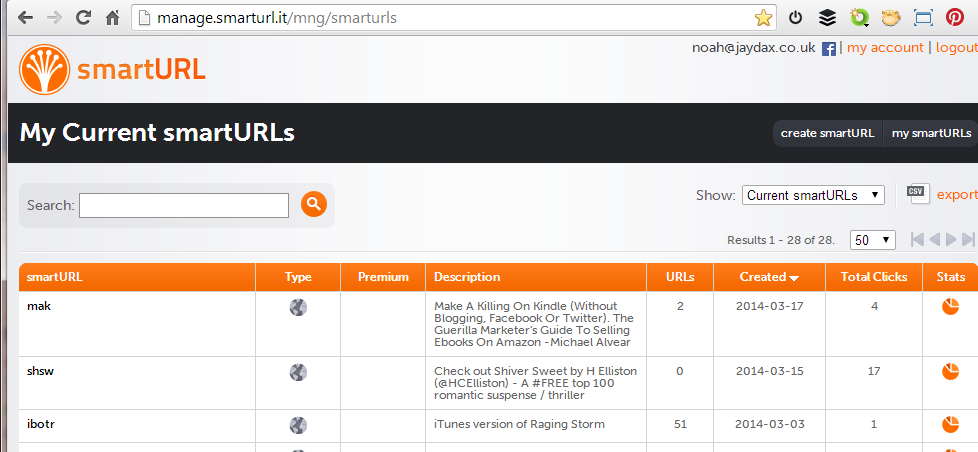
Above is an image of the control panel you get if you click the 'my smartURLs' link. At the right you'll see a mini pi chart. Click one of those and you'll get:
So that tells me: 
  • that the book was more interesting to Russian visitors than to the UK
  •  I need to check rebelmouse.com
  • just eleven clicks happened at Twitter and Facebook - that's 4.5% - maybe Michael is right after all? What do you think?
  • What went wrong on Wednesday 5th March  and Thursday 13th March?


Do you know of a similar free service which offers more? I don't. The only downside I find in using it is that like all link shorteners it can be abused and sometimes gets an orange circle from Web of Trust.


If this post has proved useful to you would you do me a favour in return? Download a FREE copy of the book I co-author - a romantic technothriller called 'Immortality Gene'. Even if you don't read it it will help our ratings. You can get it at http://smarturl.it/avi and if you want to read it, you can use a phone, a tablet, a computer or even a Kindle.