Tuesday, 18 March 2014

Using SmartURL to promote your book

It's a pain to have to change an Amazon URL to make it work in a different country. Several link shortening services offer a single link which will take the user to Amazon's site in their country. SmartURL seems the pick of the bunch for authors.

Advantages

  • A single, easy-to-remember link to your book at Amazon which works in all countries.
  • Earn an extra 9% from Amazon by adding affiliate codes.
  • Add keywords which raise your book's popularity rankings
  • Change the link easily, for example if your free book is taken out of 'price matched' in one country you can direct readers to a site where they can get it free.
  • Experiment with different keywords - even having different keywords for each country.
  • Works with iTunes and others too!
  • Track clicks on your links.
  • You can even get a QL code.

How this works. 

Smarturl.it is a link shortening service which is very effective for producing a single link which takes the reader directly to the Amazon site in their country. It allows authors to add affiliate links and keywords to the link. You can also request a particular, easy to remember link.

What you'll need

1. A smarturl account - it's free get it at http://smarturl.it
2. Amazon affiliate accounts in at least the US, UK and Canada. You can sign up for more if you wish. To get those you'll need to have a website or blog with enough traffic to make it attractive to Amazon. Don't worry if they don't accept you as an affiliate yet but you'll miss out on the extra 9% offered in affiliate payments.
3. Some spare time to research effective keywords at Amazon. For how to do this - spend some money and buy 'Make A Killing On Kindle (Without Blogging, Facebook Or Twitter). The Guerilla Marketer's Guide To Selling Ebooks On Amazon' by
Michael Alvear http://smarturl.it/mak Let me warn you though - although you can learn valuable stuff from this book, I don't agree with Michael that we are wasting our time promoting using social media. Getting the keywords right will help your book sales but it's more effective if you use social media as well.

Ready? Here's how to do it.

Let me show you how I made the link to the book I just told you about.
  1. Go to smarturl.it and log on. Click the 'create smartURL' link, (in the black bar)
  2. In a different tab go amazon.com and find the book or product you want to link to. I suggest you enter the book ASIN and the keywords you want to use in Amazon's search box. Don't forget to add the author name as keywords too.
I'm going to use Michael Alear's book mentioned above as an example; it's ASIN is B007XVWEIU - I used the following keywords in the search box
B007XVWEIU Make a killing on Kindle Michael Alvear marketing Kindle keywords selling books e-books on Amazon
Notice I didn't use any commas to separate them.

  1. On the results page click the link to Michael's book. Your search parameters will follow you and you'll get the URL
    http://www.amazon.com/Killing-Blogging-Facebook-Guerilla-Marketers-ebook/dp/B007XVWEIU/ref=sr_1_1?ie=UTF8&qid=1395149205&sr=8-1&keywords=B007XVWEIU+Make+a+killing+on+Kindle+Michael+Alvear+marketing+Kindle+keywords+selling+books+selling+e-books+on+Amazon
  2. Copy the URL from your browser and paste it into a text editor (not MS Word - use Edit or a text editor you like such as EditPlus)
    You could probably edit out keywords such as 'a' and 'on' but it isn't worth the bother.
  3. If the book is NOT free then, to this URL, add your affiliate tag for Amazon.com I usually bury it somewhere inside it just before '&keywords' Mine would now read:
    http://www.amazon.com/Killing-Blogging-Facebook-Guerilla-Marketers-ebook/dp/B007XVWEIU/ref=sr_1_1?ie=UTF8&qid=1395149205&sr=8-1&tag=jaydax08&keywords=B007XVWEIU+Make+a+killing+on+Kindle+Michael+Alvear+marketing+Kindle+keywords+selling+books+selling+e-books+on+Amazon
    Remember - only add an affiliate tag to books which are NOT free. Amazon don't like you using tags for free products and may penalise you.
  4. Now look in the URL for a part starting &qid= followed by a number. Delete that entire section! In my example it will now read:
    http://www.amazon.com/Killing-Blogging-Facebook-Guerilla-Marketers-ebook/dp/B007XVWEIU/ref=sr_1_1?ie=UTF8&sr=8-1&tag=jaydax08&keywords=B007XVWEIU+Make+a+killing+on+Kindle+Michael+Alvear+marketing+Kindle+keywords+selling+books+selling+e-books+on+Amazon
  5. Now copy the link and paste it into the Default URL box in your smartURL tab
  6. Now you need to get the URL for Amazon UK and Amazon Canada and add affiliate tags if you have them. You can either go through the whole process again or just modify the amazon.com link in your text editor. I find it's easier to modify the link since all you have to do is change '.com' to '.co.uk' for the UK and '.ca' for Canada. You'll need to change the affiliate tags too.
  7. Once you have the URLs enter them in the section 'Country Destinations'. You'll need the country code for the 'Country' box. For the UK it's GB and for Canada it's CA Click the + to add more alternative countries. If you don't know the code just type in the name of the country. Add as many as you like/have affiliate codes for. Any you don't add will be added automatically  from your default URL by smartURL but they'll use their own affiliate codes - this is how they make the money to run the site.
  8. Now add a custom alias to the link. I add a three letter one. In the case of the book above I used 'mak' (from Make a Killing...). Not all of these are available so if someone already has that - try another. Don't forget the URLs are case sensitive so 'mak' is different to MAK, MaK and Mak.
  9. Add a description of the link if you wish. This helps you remember what it is when you come back to it.
    It's also possible to enter someone's email address which allows them to change the links. (If Michael Alvear reads this I'll be happy to add his email address if he sends me it - he could probably come up with better keywords)
  10. Once you are happy with everything click 'Save' and start using your new link.

What's that bit about tracking clicks?
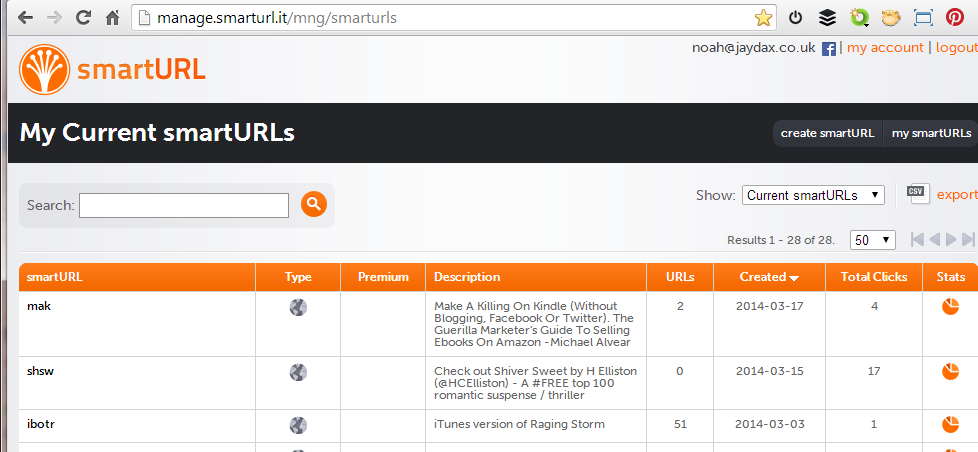
Above is an image of the control panel you get if you click the 'my smartURLs' link. At the right you'll see a mini pi chart. Click one of those and you'll get:
So that tells me: 
  • that the book was more interesting to Russian visitors than to the UK
  •  I need to check rebelmouse.com
  • just eleven clicks happened at Twitter and Facebook - that's 4.5% - maybe Michael is right after all? What do you think?
  • What went wrong on Wednesday 5th March  and Thursday 13th March?


Do you know of a similar free service which offers more? I don't. The only downside I find in using it is that like all link shorteners it can be abused and sometimes gets an orange circle from Web of Trust.


If this post has proved useful to you would you do me a favour in return? Download a FREE copy of the book I co-author - a romantic technothriller called 'Immortality Gene'. Even if you don't read it it will help our ratings. You can get it at http://smarturl.it/avi and if you want to read it, you can use a phone, a tablet, a computer or even a Kindle.


Monday, 17 March 2014

An Agent Rejected Your Submission?

One thing you should be prepared for though; agents are absolutely inundated with submissions. They probably will take a while to look at what you wrote and may very well return your submission. Few are accepted. If that happens – don’t give up, try a different agent. I've seen reports that an average agent accepts just 2% of authors who approach.
The chances are that sooner or later you’ll probably get discouraged by rejections. At that point you should take a serious look at what you've submitted.

Five points you need to check:

  • Does it have that ‘hook’ to catch interest? In other words does it catch your interest in the very beginning? Think of how you browse for books in a bookstore. Would you buy your book based on the content of the first three pages?
    Here’s the opening paragraphs from ‘The Power Trip’ by Jackie Collins as an example:
      The couple on the bed had sex as if it was their final act. And for one of them it was.
      Neither of them heard the door slowly open.
    Would that make you want to keep reading?
  • Get someone else to read the synopsis you include. Do they find it interesting?
  • Does it have a prologue? If so get rid of it. For many agents a prologue is an instant turn-off. Oh – before someone points out that those Jackie Collins lines come from the start of a prologue, it seems a very short prologue – more like a very short chapter which Jackie didn't dare call ‘Chapter 1’.
  • Is the story the right length? It should be 60,000 -120,000 words. Any shorter and publishers will be reluctant to publish it because setting it up will be too expensive. Any longer and it will be too expensive to edit and they’ll be reluctant to invest so much in an untried author.
  • Is your accompanying letter good enough? Try including in your cover letter a one paragraph story synopsis starting with 'When..' and using this formula. 
    [Protagonist] who finds himself/herself in [situation] from which he/she tries to free himself/herself by [goal]. However, the [antagonist] wants to stop [protagonist] from this, and if successful, will cause the [protagonist] to experience [disastrous result].
    Here’s an example of its use:
    When a young girl moves to live with her father in a small town in Washington, she meets the boy of her dreams. He has a dark secret which she discovers. In doing so, she finds herself at risk of death from people like him. She is rescued by her new boyfriend, but still is at risk from others like him who want to kill her. She knows that all will be solved if she shares her boyfriend’s secret, but he is reluctant to allow this since he fears it will turn her into a monster.
    Recognize the story? Twilight?
If you are confident that you have met all these requirements, continue making multiple submissions to agents at the same time rather than one at a time. Agents don’t really like you doing this but often it’s the only way to cut submission times from years to months.
The one thing you shouldn't do is to allow yourself to be discouraged to the point where your book is never published ‘because it isn't any good’. Repeated rejections are quite normal. Few authors ever find success immediately. I know of one successful author who bound all her rejection letters into a long roll and when she’s asked to speak about the process dramatically allows it to unroll across the room.

By the time you've had 30 rejections it's time to consider going down the self-publishing route. Maybe you should have done that first?


Tuesday, 24 December 2013

Got a new e-reader? Here's where to get the free stuff at Amazon

Amazon don't always make it easy to find free books - and there are lots of them. To make it easy for you here are links to a number of free genres

Best Sellers in Action & Adventure Fiction

Best Sellers in Action Thriller Fiction

Best Sellers in Crime Action Fiction

Best Sellers in Fantasy Adventure Fiction

Best Sellers in Fantasy

Best Sellers in Genetic Engineering Science Fiction

Best Sellers in Historical Fiction

Best Sellers in Horror

Best Sellers in Humor & Satire Fiction

Best Sellers in Men's Adventure Fiction

Best Sellers in Mystery Action Fiction 

Best Sellers in Mystery, Thriller & Suspense Action Fiction

Best Sellers in Paranormal Romance

Best Sellers in Romance

Best Sellers in Romantic Suspense

Best Sellers in Science Fiction

Best Sellers in Science Fiction Adventure

Best Sellers in Science Fiction & Fantasy

Best Sellers in Suspense Action Fiction

Best Sellers in Technothrillers

Enjoy your reading but remember that somewhere there's an author who devoted a lot of time to providing you with free entertainment. You can repay them by writing a review for those books you enjoy. You may have hated writing book reviews while you were at school but that's not the sort of review needed. Here's another link to a guide to writing book reviews.

One last link. You can get a FREE copy of our book 'Immortality Gene' at Amazon, Smashwords and elsewhere.


Saturday, 21 December 2013

Getting Word to display odd pages on the right

Like most authors, I use Microsoft Word and rapidly discovered one of it's limitations. Word insists on starting any new document on a left hand page in a two page layout. There is nothing you can do to change this. Microsoft tell us that Word isn't a publishing program and apparently expect us to import Word documents into a program such as Publisher before printing. Now that, for us authors, is the last thing we want. We want a single program on which to create our work and format it for printing. Word can be made to do it - almost.

So this is how to set up Word 2010/2007 or Word in Office 365 to produce a layout suitable for self publishing through a print-on-demand service.

If you do not have a correctly formatted document that you can copy and modify then you'll need to create one as follows. To illustrate it, I've used examples from our book 'Immortality Gene':

  1. In Word choose File → New → Blank document

  2. Select 'Print Layout' view

  3. From the Page layout tab select in the Page setup group the 'Size' button and then at the bottom of the dropdown 'More Page Sizes'

  4. Using the 'Paper' tab, select what size pages your book will have. I use a custom size of 13.33 x 20.32 cm (5.25 x 8 inches) which is one of the standard book sizes. Your self publishing firm will tell you what standard sizes are available. I suggest you take a trip to your local library or bookstore and measure a few books too. A5 (14.81 x 20,99 cm or 5.8 x 8.3 in) is a common size offered.

  5. Still in the 'Page Setup' window, on the 'Margins' tab select a top margin of 2 cm; bottom margin of 2.54 cm; inside margin of 1.27 cm; Outside margin of 1.0 cm; gutter of 0.95 cm; Gutter position Left (greyed out); Portrait; Multiple pages should Mirror margins; Apply to Whole document. This setup is good for a book of up to 600 pages. If you have less than 400 pages you can reduce the gutter and if you have more than 600 pages you'll need to increase the gutter. For those who don't know 'gutter' is a printer's term for extra space added to the fold of a book which allows text to be read easier.
  6. Still in the 'Page Setup' window, on the 'Layout' tab select Section start New Page; Check in the Header and footers tab Different odd and even; Un-check Different first page; set the header and Footer to 1.25 cm from the edge; Under Page select vertical alignment Top. Then click OK.
  7. Turn on the ruler and set it as shown in the image above with no indents.
  8. Double click the page area where the header would be (i.e. above where the cursor is currently flashing)
  9. Check 'Different Odd & Even Pages'. You should now see 'Odd Page Header' at the header and 'Odd Page Footer' at the footer.
  10. Close the Header and Footer view
  11. At the top of the page type in CAPITALS your book title and center it. (This is NOT your main Title Page, it's called a half title page)
  12. Insert TWO page beaks . If you are looking at the document in Print Layout view, two pages per screen your first page will appear on the left
  13. The next page will be your main title page where you put the title, the author. I also add at the bottom the location and year of writing. Format this page as you wish it.At the end of the page insert a Page break.
  14. Your next page will be a copyright page and if you have one, put your ISBN/EAN number here. Example text - customise and space appropriately:

    John and Sheila Chapman have asserted their right under the Copyright, Designs and Patents Act 1988 to be identified as the authors of this work.


    This book is a work of fiction and, except in the case of historical fact, any resemblance to actual persons, living or dead, is purely coincidental.

    Copyright © 2010 John & Shelia Chapman

    All rights reserved under International and Pan-American

    Copyright Conventions.

    ISBN 1-456-30018-0

    EAN-13 9781456300180

    Add a page break at the end of this.

  15. Your next page will contain any acknowledgments you wish to make or will be blank. Add a Page break then a Section Break (Odd page) at this point.
    The 'Section Break (Odd Page)' is the crucial step!
    Note - Inserting a section break (any type) will add a little extra space before the next heading - this is normal practice. Subsequent headings won't have this extra space.

  16. You are now ready to start the text of your book, to reset the ruler, to add a page header and a footer with page number 1. If your book has contents pages add them at this point. Contents pages should always be an even number of pages so add a page break if needed then a 'Section Break (odd page)' so that Chapter 1 of your book always appears on a right hand page.
  17. At the top of the Chapter 1 page (or first contents page if you have one) double click the header area. In the Navigation section of the Header & Footer toolbar make sure 'Link to Previous' is NOT selected. make sure Different Odd & Even Pages IS checked then add the book title in Capitals. Center it.
  18. Double click the Footer area of the page (or click the Footer button on the toolbar) Use the Page Number button to add a page number either centered or at the right. Format the page numbers so that they start at '1' (Right click the number to find 'Format Page Numbers...').
  19. In the Navigation section of the Header & Footer toolbar click 'Next'.
  20. In the Navigation section of the Header & Footer toolbar again make sure 'Link to Previous' is NOT selected.
  21. In the Header add in capitals the author's name and center it. In the footer section again make sure 'Link to Previous' is NOT selected and add a centered page number at the bottom. Select and right click the number and choose Format Page Number. It should be set at 'Start at 1'. The actual page will show page 2.

You should now find that from your 'Chapter 1' the pages will be displayed on the correct side in 'Print Layout' view. If you Add the 'Print Preview Edit Mode' button to the Quick Access toolbar (22) you'll find on using it that all pages (in a two page view) are shown on the correct sides. Extra blank pages will be inserted to make sure the main title page and Chapter 1 pages are on the right hand side.

Following chapters should each start on a new page but usually it is not important that they should start on right hand pages. If you have a short book of less than 80,000 words though you might like to insert a 'Section break (odd Page)' rather than a standard 'Page Break' to force this.

A word of warning about something which MS Word gets wrong and which can cause problems with CreateSpace. Word allows italic text to overflow slightly into the gutter and CreateSpace will reject this.
To solve this problem, which only occurs if you use italics in your text, reset the style so that the text is indented 1mm


If this post has helped or entertained, will you help us? Download a FREE copy of our book 'Immortality Gene' from http://smarturl.it/avi
Even if you never read it (but we hope you will) - it will help our rankings.
Look - a FREE e-book

Monday, 7 October 2013

Twitter for Authors

Every indie author needs a Twitter account. It's a vital tool for promoting your books. When you first use it though it seems a little pointless. Many people start an account and then drift away because they just don't know what's going on. I wrote this author's guide to Twitter as part of my book 'A Guide to Getting Published'.

What is Twitter?

Twitter is like mini-blogging. In a blog you are not limited in length. On Twitter you are allowed just 140 characters – including spaces and punctuation. You need to build a Twitter following. When you start using Twitter it will invite you to add those people who have Twitter accounts on your email contact list and those on your friend list at other social media sites. It will also invite you to follow the accounts of celebrities. You don’t have to know the ‘Tweep’ as they are called. Just start with your email and other ‘friends’ and see what they are posting on Twitter.

The image above shows a typical tweet. The original tweet has been re-tweeted twice. As far as authors are concerned this is the power of Twitter. A post can be tweeted and quickly go viral if it strikes the right chord.
You can get Twitter account at http://twitter.com. It’s possible to sign up for more than one account but you will need a unique email address for each. There’s also an app available for smartphones, Android tablets (including the Kindle Fire HD) and iPads. These apps are free.
So how does one start? The answer is first to build up a following. There’s a useful application which will help you do this – Crowdfire (formerly JustUnfollow). Find it at https://www.crowdfireapp.com/. Although its old name suggests it is a tool for getting rid of followers, it’s far more useful for finding new people to follow. Crowdfire has a web page that you can use with a desktop computer but also has a mobile app which can be put on a smartphone or Android tablet from the Google Play Store. Unfortunately it doesn’t seem to be available at the Amazon App Store. 

Don’t get suckered into buying followers! A word of warning – there are many webpages which claim you can buy followers by the thousand. Doing this is against Twitter’s user policy and most of these ‘followers’ will be useless to you.

Who not to follow

I suggest you don’t follow:
·         People who have not tweeted for more than two months.
·         People who only tweet quotes.
·         People who never re-tweet others.
·         People who only tweet links to things to buy.
·         People who post only pictures.
·         People who never respond to others – look for tweets starting @....
·         People who don’t have a profile picture.
·         People whose tweets always start with “I….”
·         People who don’t appear to speak your language.
·         People who follow very few people compared with their number of followers. Follow these only if they interest you. There is a sneaky trick you can use here though.
Note - for every one of these guidelines there is an exception that says ‘…unless they are really interesting.’

Who to follow

Look for people who are active on Twitter. Try to gather followers interested in what your book is about. Find people who read and especially people who review the books they have read.
By all means follow me - @JChapmanAuthor but I suggest you don’t until you follow at least 200-400 other people. I tweet an awful lot and don’t want to monopolise your Twitter feed
If you follow John Locke’s promotion system beware of acquiring a following which consists purely of authors. Try to get a varied audience. Authors do buy books though and they will help you by re-tweeting your posts and coming up with good ideas. Help them back! It pays.
A process I’ve found useful in finding Tweeps (The name of Twitter users) is to look at the ‘follower’ list of others. You can do that using an application such as JustUnfollow or do it directly by selecting the followers of someone from their profile page. To get to someone’s profile page just click their Twitter handle – the bit starting @.... At the top left you’ll find a link ‘Followers’. Click that to get a list of them. In the image below I show doing that with one of the people I follow – Karin Cox (@Authorandeditor). Karin’s tweets show she thinks in the same way as I do and I’m pretty sure that people who follow her will be worth investigating.
You can also check the list of people a Twitter friend follows. That’s not possible in JustUnfollow though.
Whichever system you use I suggest you don’t try to follow more than 125 people in one go. Even then it’s wise to spread that over several hours. Twitter may think you are spamming and freeze your account for a while.
Click the Twitter name of each and check the posts in their profile. Don’t follow blindly! Use that list of who not to follow above as a guide for weeding out people who won’t be of use to you. Aim to add 25 people to your ‘Following’ list each day Spend a few minutes scanning through posts each day and check out the tweets of those who follow you. Keep this up until you are following 2,000 Tweeps. At this point a Twitter limit will kick in and you’ll find you can’t add more to your ‘following’ list. To add more you’ll need to have a 90% followers to following ratio. If you want to have that 2,001st person you must be followed by 1,801 people. To follow 3,000 people you must be followed by 2,700 people. At this point Crowdfire will really become your friend.

What to tweet

Tweet a variety of items. Read the tweets of those you follow, respond or re-tweet those which strike a chord with you, browse the web and tweet pages you find of interest. There’s a useful browser extension you can get - Buffer at http://bufferapp.com which will help you do that. (You can find more information on Buffer and its alternative, HootSuite online.) Read the news; post interesting items and make meaningful comments. If you find an interesting or funny quote then by all means post it - just not endless quotations. Use Twitter to point people to your blog and website.
Place advertisements for your book in posts but do so very sparingly. You should not make more than 15% of your posts links to your books. Never make ‘Buy my book’ posts. Instead post ‘I came across this while I was researching my book…’, ‘I wrote about this in…’ or links to blog articles with subtle book references. Ask questions - ‘Want a #free #technothriller? ….’

Twitter – a snapshot in time

Whenever you go to Twitter you’ll see a snapshot of recent tweets. As the number of people you follow grows that snapshot becomes a tiny window through which you look at a huge panorama. When you are following a thousand Tweeps there will be new posts every few seconds. You will not see the vast majority of the tweets people you follow post. Neither will your followers see most of your tweets unless you put their twitter username in the post. My friend Aaron Hatman - @aaronhatman probably won’t see a post like this:
‘New topless Rhianna picture! pic.twitter.com/bAZLbuKL (pic)’ (For those of you who are shocked – it’s not quite what you think).
Aaron would see it if it was posted as ‘@aaronhatman - New topless Rhianna picture! pic.twitter.com/bAZLbuKL (pic)’. Even if Aaron is not using Twitter when the post is made he will see it when he clicks ‘@ Connect’ on the Twitter toolbar
Not only will Aaron see the post but it will also appear on the Twitter feed of anyone who follows Aaron and that’s useful! (Dirty Twitter trick coming up) If you want all your followers to see the tweet start it with '.@'.

Twitter Spamming

Some Twitter users set out to build a huge Twitter following by following everyone they come across, waiting a few days and un-following all those who have not followed them back. If they run out of follow rights then they make space by un-following even those who have followed back. These people just want followers – they are not interested in taking part in conversations. Once they have built up thousands of followers they will usually start posting nothing but adverts – Twitter spamming. If you identify such a person is now following you. Don’t follow them back – respond to their following message with a message such as
‘Thanks for the follow @selfishtweep. Check out my pyramid #technothriller Stones,Stars & Solutions http://amzn.to/16osMxN
Not only will this appear on their feed but it will also appear on the feeds of all those who have been silly enough to follow @selfishtweep.

Making your tweets work for you

An average Tweep won’t spend long on Twitter each day so the chances of them seeing your post are small but there are several things you can do to increase the odds.
1.       Tweet more often. Professional marketers make posts up to six times an hour 24/7. Of course that’s quite impossible to do if you also want to write books, sleep, eat and enjoy life. The answer is to use an automatic tweeting service such as Buffer or HootSuite to tweet on your behalf.
2.       Use hashtags to make your tweets more discoverable. I used the hashtag #technothriller in my post above. Hashtags are keywords used by groups of Tweeps. They can be normal words or a collection of symbols. Try to use two hashtags. That gets you 21% more attention. Using more than three has the opposite effect. If you must use three then put two together and the third as far away from them as possible. Don’t start your tweet with a hashtag.
3.       Try to keep your tweets to less than 120 characters. Shorter tweets draw more attention
4.       Re-tweet the posts of other authors. They often respond by re-tweeting your posts. There are Twitter groups which you can join which do this. Find them on Facebook or at Goodreads. One such group is ASMSG – Author’s Social Media Support Group (http://on.fb.me/18KucG0)
5.       We are told Twitter works best at the weekend. I’ve found that to be true. You can check this for yourself after you’ve been on Twitter a while by getting a Tweriod report (http://www.tweriod.com/) which will tell you the best times to tweet.

Helpful websites for Twitter are:


Happy tweeting... and if you can think of anything I've left out which may be of use to authors... why not add it in the comments below?

Saturday, 28 September 2013

Re-tweet those who re-tweet you

Do you as an author help people who help you? I do. I keep track of those who help me and make darn sure I help them. Here's how I do it.

Keep an eye out for those who re-tweet posts useful to you. Those tweets you make which lead to your books in some way. Pick out and re-tweet posts they make which will help them – you owe these people and you’ll want them to continue to support you.
Here’s how I keep track of this – I use the Thunderbird email client (It’s free) However most email clients will allow you to do this so you don't have to use Thunderbird.

How to keep track

Every time someone re-tweets you Twitter will send you an email (if you have not turned this off in settings). I set up an email filter to collect all these tweets in a separate folder.
Periodically I step through the emails in that folder and pick out those tweets which mention my books or blog posts and add a star to them.
Want to see my post about the Last Supper painting? Just click.
I don’t add a star to those re-tweets which won’t help my book promotion. For example news items I tweet or quotes.

Use #FF Follow Friday

On a Friday I then sort my folder of re-tweets first by sender’s name and then by star by clicking the column headings. This sorts everything and I can easily see who has helped me the most. At the time I wrote this here are my top Tweeps who re-tweet my promotional tweets the most.
Click to go to Niki Savage's Twitter page
Of course I make sure to repay the favour and these people are the ones I add to my tweet list for regular re-posts.
Of course that’s not to say I’m not grateful for all the other re-tweets since anyone re-tweeting my posts helps grow my following. I often re-tweet other people's posts like that which I have found entertaining. Sometimes I'll add those too to my tweet list.

Does this seem a little calculating? Perhaps not in the spirit of social media? Perhaps, but if I don't do everything I can to promote our books then they'll remain unknown, no matter how good they are. If that means I must help others because of profit rather than altruism then so be it. .oO(...but it does make me feel good to help others where I can.)

What do you think? Is preferential  re-tweeting the promotion of those who help you being too mercenary?

Sunday, 15 September 2013

Taking advantage of spammers on Twitter

I really hate spam and when I get spamish followers on Twitter I don't follow back. Can you make use of them though? Yes you can. Here's an extract from a guide I'm working on:

How Twitter posts work

Whenever you go to Twitter you see a snapshot of recent tweets. As the number of people you follow grows that snapshot becomes a tiny window through which you look at a huge panorama. You will not see the vast majority of the tweets people you follow post. Neither will your followers see most of your tweets unless you put their twitter username in the post. 
My Twitter friend Aaron Hatman - @aaronhatman probably won’t see a post like this:
‘New topless Rhianna picture! pic.twitter.com/bAZLbuKL (pic)’
 (For those of you who are shocked – it’s not quite what you think).
Aaron would see it if it was posted as:
 ‘@aaronhatman New topless Rhianna picture! pic.twitter.com/bAZLbuKL (pic)’
 Even if Aaron is not using Twitter when the post is made he will see it when he clicks ‘@Connect’ on the Twitter toolbar.

Not only will Aaron see the post but it will also appear on the Twitter feed of anyone who follows Aaron and that’s useful! (Dirty Twitter trick coming up)

Twitter Spammers

Some Twitter users set out to build a huge Twitter following by following everyone they come across, waiting a few days and un-following all those who have not followed them back. If they run out of follow rights then they make space by un-following even those who have followed back. These people just want followers – they are not interested in taking part in conversations in the Twitter community. Once they have built up thousands of followers they will usually start posting nothing but links to products for sale – Twitter spamming. 

Dirty Twitter Trick

If you identify such a person is now following you - let's say their Twitter handle is @selfishtweep - don’t follow them back – respond to their following message with a message such as:
‘Thanks for the follow @selfishtweep. Check out my pyramid #technothriller
Stones,Stars & Solutions http://amzn.to/16osMxN

Not only will this appear on their feed but it will also appear on your feed as an 'un-spamish' post and the feeds of all those who search for @selfishtweep. 

Now the question is 'Is this ethical or am I adding to Twitter spam?' What do you think?