Sunday, 14 October 2018

Getting your book description right - Two examples


Let’s take a look at the keywords and descriptions of two best-selling ebooks

Here’s what a reader would see if they looked at Amazon’s page for ‘My Sister's Grave’ by Robert Dugoni which on 18th October 2016 was number 6 in Amazon’s best seller list.
Would that description inspire you to click the ‘Read more’ link? No? I wouldn’t either. Checking I found the full description was 778 characters, none of the nine keywords the book uses are in the description. Eight of them are Amazon categories but one ‘United States’ isn’t and seems rather pointless ('US' might have been a better choice).  I suspect this ebook appears in Amazon’s top listings because of the reputation of the author (Ranked #40 at Amazon at the time of writing) and because of the publisher paying to have it promoted. If I was the author, I would be upset at the publisher (Thomas & Mercer) for doing so little. You can see Amazon’s top 100 authors at:      https://www.amazon.com/author-rank#1

My second example is ‘A Shade of Vampire’ by Bella Forrest. Here’s what you would see before that ‘Read more’ link:
Notice the use of bold text? You can use limited HTML to do this in a description. Notice also the writer has appealed to Twilight, The Mortal Instruments and Vampire diaries fans also. Be careful here that you don’t mention other author’s names or copyright items since this is likely to get your book a lower ranking. In this case, especially since the description stops mid-sentence, I would read on.
This time the description is 3,070 characters long and includes short review statements. Bella Forrest appears to be self-published. She uses 17 keywords/tags. Here’s how she uses them:
·         One appears in the title (vampire)
·         Romance and fantasy are keywords used in the description
·         Romance, vampire, werewolves, shifters, coming of age, romantic, angels, ghosts, psychics are compulsory keywords for specific Amazon categories
·         Werewolves & Shifters, Science Fiction & Fantasy, Paranormal & Urban, Teen & Young Adult, Demons & Devils, Witches & Wizards, Paranormal & Fantasy are Amazon categories
Seems to me Bella Forrest has done a pretty good job of her keywords and description.
No description is ever perfect though so it’s always worth revisiting and tweaking the next time you produce a new book edition. This is what Bella Forest's description looks like now:
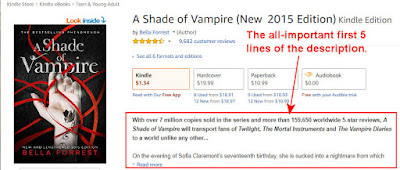
It's certainly worth mentioning those extra 2 million sales and the 5-star reviews but that extra text has pushed out of visibility 'she cannot wake. A quiet evening walk along a beach brings her face to face with a dangerous pale' It's still effective though but perhaps that blank line could have been made narrower using embedded styles in the HTML Unfortunately Amazon allows none of that 'clever stuff' in their author HTML Only the following tags are allowed:
HTML Tag
Description
<b> Formats enclosed text as bold. Use: <b>This text will be bold</b>
<br> Creates a line break. Use: <br>
This text is forced to the next line
<em> Emphasises the enclosed text; generally formatted as italic.Use: Normal text <em>emphasised text</em>
<font> Determines the appearance of the enclosed text. Use: It is possible to use <font face="Courier New, Courier, monospace">a different choice of font</font>
<h1> to <h6> Formats enclosed text as a section heading: <h1> (largest) through <h6> (smallest). Use:
<h1>This is heading 1</h1>

<i> Formats enclosed text as italic. Use: <i>italic text</i>
<li> Identifies an item in an ordered (numbered) or unordered (bulleted) list. Use: See <ol> and <ul>
<ol> Creates a numbered list from enclosed items, each of which is identified by a <li> tag. Use:
<ol>
<li>This is first</li>
<li>This is second</li>
<li >This is third</li>
</ol>
This produces:
  1. This is first
  2. This is second
  3. This is third
<p> Defines a paragraph of text with the first line indented; creates a line break at the end of the enclosed text. Use:
<p>This is some text which you want displayed in a paragraph. This paragraph is not very interesting but then… maybe I should tell you about the next book I'm writing. It's about time travel.</p>
<p>Nope - you don't want to hear about that. This is the next paragraph.</p>
This produces:

This is some text which you want displayed in a paragraph. This paragraph is not very interesting but then… maybe I should tell you about the next book I'm writing. It's about time travel.

Nope - you don't want to hear about that. This is the next paragraph.
<pre> Defines preformatted text. Use:
<pre>Here's an example of preformatted text. It's usually monospaced.</pre>
<s> Formats text as strikethrough. See also, <strike>.
<strike> Formats text as strikethrough. See also, <s>. Use: <strike>this text is struck out</strike
<strong> Formats enclosed text as bold. See also, <b>.
<sub> Formats enclosed text as subscript: reduces the font size and drops it below the baseline. Use H<sub>2</sub>O which produces H2O
<sup> Formats enclosed text as superscript: reduces the font size and places it above the baseline. Use: πr<sup>2</sup> which produces πr2
<u> Formats enclosed text as underlined. Use: <u>This text will be underlined</u>
<ul> Creates a bulleted list from enclosed items, each of which is identified by a <li> tag.
. Use:
<ul>
<li>This is first</li>
<li>This is second</li>
<li >This is third</li>
</u>
This produces:
  • This is first
  • This is second
  • This is third
NOT Allowed HTML/CSS <div> <span> and any CSS

Extra keywords

Did you notice that I said both examples of book descriptions used more than the seven keywords Amazon allows you to use? That is possible if you produce an epub book with meta tags and use that as the source document at Amazon. They will still expect you to submit up to seven keywords but also appear to use the extra ones you put in epub meta tags.

Description content

Now - what about the content of your book description? The first five lines of it are by far the most important. In those five lines of text you must capture enough of the readers interest to make them want to click that 'Read more.' Work at those five lines. Use power words - words that have great emotional impact. Above all leave the reader on a cliffhanger where they have to find out what comes next. Try putting the sentences through a headline check - there's a good one at https://coschedule.com/headline-analyzer Try and get a score of 60+ for each sentence.

Keywords

Book descriptions are searched by Amazon for keywords other than the seven they ask for. Try including more keywords in your description to capture those people who search for books like yours but not with your chosen keywords.  There's an art to choosing keywords and if you have only seven, chosen in ten minutes when you came across that section of KDP, then you haven't understood that art yet, But that's the subject of a 'Getting your keywords right' blog.

Monday, 24 September 2018

Do you want me to follow you on Twitter/BlueSky?

Then...

1. Do you have a profile picture other than the default or an egg?    ... No? Then there's no chance unless it's something like ...

2. Have you added a profile description? ...  No? Then you have no chance.


3. Are you trying to sell followers? ...
Yes? No chance and an instant block. I don't want my followers to see your posts. Buying fake and useless followers is pointless.

4. Do you send out 'haha' direct messages? ... Yes? I'm not going to follow your link to a malware site and certainly won't follow you. Expect an instant block.

5. Are your tweets full of swearwords?Yes? There's not much chance unless there's a reason for using them. Try replacing the 'F' word with 'Sandwich'. ' It makes just as much sense and it's a lot funnier. (Thanks for that suggestion David Icke)


6. Is your profile written in good English? …
No? Sorry spelling and grammar are still important and if you make too many mistakes, I'm unlikely to follow you.

7. Do you send out lots of direct messages? … Yes? Then I'm already following you but I won't be for much longer. The occasional one in a private conversation is OK. DMs can be an intrusion though - especially the pointless ones which say  just "Hi". If you send me a link that I haven't asked for then I'm NOT going to click it.

8. Are you trying to be offensive? ... Yes? Then there's no chance. No one likes trolls.

9. Do you post sexually explicit pictures? ... Then you've no chance and will be blocked by me and are likely to blocked by Twitter soon.

10. Are your tweets and profile full of text abbreviations? ... Ys? b4 I fllw U id hv 2 b crzy


11. Do lots of your tweets have links with red WOT circles? ... Yes? Then there's little chance. If you don't know about Web of Trust - WOT - you should do.

12. Does your profile mention your religion? ... Yes? Then there's little chance. Go preach somewhere else. Telling me you are Christian/Muslim/Jewish/etc tells me only that faith (belief based on no evidence) is acceptable to you. You're wrong - Faith is the cause of the world's greatest evils.

13. Does your profile mention your politics? ... Yes? Then there's little chance and you might not want me to follow you either because I enjoy poking fun at politicians. Here's a blog post about the 2010 UK election.

Tweet: If you want followers, here's some things NOT to do - http://bit.ly/twitint Found this useful so far? Click the button to Tweet this page.

14. Do you sometimes retweet others?  ... No? Then there's not much chance unless you are really interesting

15. Do you respond to others tweets? ...No? Twitter is all about interaction so I probably won't follow you.

16. Do you have more than 1,000 followers but have tweeted less than 100 times? ... Yes? I don't follow celebrities with nothing to say or people who have bought or gained useless followers.

17. Do you ONLY retweet others? ... Yes? Then there's not much chance (unless you are retweeting me). Many Twitter spammers do that. Try at least pinning one of your posts so that it shows at the top for me to retweet in return.

18. Do you retweet the same 20 tweets endlessly? ... Yes? Then there's no chance. Try retweeting from a bank of 1,000+ tweets.

19. Do you use TrueTwit? ... Yes? Then there's no chance of me 'validating.' If you want to find out why - check here.

20. Do you allow autotweets about how many people unfollowed/followed you or to thank people for following?  ... Yes? Then that's not good but there's some chance if something else catches my interest. Rather than thanking people - retweet one of their tweets.


21. Do you tweet or retweet multi line posts like this:
Yes? These are so annoying, especially if you are using Twitter mobile apps. I'm not going to follow anyone who hogs so much space on my screen!

22. Are all your tweets adverts for something? ... Yes? Then there's no chance and I'll probably mute your tweets. You shouldn't include adverts more often than 1 in 10 tweets/posts. 1 in 15 is better. 

23. Are all your tweets quotes? ... Yes?  Then there's not much chance unless you find really interesting quotes I've never heard before.

24. Do most of your tweets start with ' I ' ... Yes? Then there's not much chance unless you are really interesting. That's called being a bore.

25. Are most of your tweets about sport? ... Yes?  Then there's little chance. If you do that expect to cut your followers by at least 50%

26. Are you promoting/tweeting about Apple products? ... Yes? 50% of people are not at all interested and a good percentage of those think Apple users have more money than sense. Because of the latter people who want to sell you things will probably follow you.

27. Are your tweets protected? ... Yes? Then there's no chance. I'm not going to follow anyone I can't see.


28. Are you pretending to be Yoda, Shakespeare, Oscar Wilde, Sherlock Holmes, Einstein etc.
Yes? I'm tired of these so there's little chance - do something original.


29. Are most of your tweets automessages 'Thank you for following me...'? Yes? Then I doubt if you'll be sending one to me. Here's Rachel Thompson's blog about why you shouldn't allow autotweet messages
Even worse - someone who retweets 'Thank you for following me' tweets.

30. How many hashtags are you using? 1-3? That helps (2 is best) 5 or more - You must be kidding! Is the key stuck? ###################### How many hashtags are in your Bio?

31. Do you follow tweeps and unfollow them 1-2 days later? … Yes? By the time I get round to checking your tweets, you'll probably have unfollowed me and I probably won't follow you because I doubt if you're real.

32. Are you really a 'bestselling author? I'll check, and if your books have an overall rank at Amazon.com of over a million, I'll probably laugh, feel smug, and move on Beware the (desperate) bestseller.

33. Is your profile picture one showing an attractive young female? I'll check you out carefully (No, not that way) to find if you are fake. This profile picture (which I've partially pixelated) proved to be one used by several tweeps all of which had 30-40% fake followers. This may be a little unfair to genuinely attractive young women but you'll have to live with it. To check a profile picture in Google Chrome right click it while holding down the 'S' key.


34. Does your bio have a comment "Follow me and I'll follow back" or use the hashtag #Followback? Whilst I might tolerate you following me, I'm unlikely to follow you back and I'll probably hide posts with your twitter name. You will accumulate hundreds of fake followers with that statement. Spend some time and check those you follow.

35. DO YOU TWEET IN ALL CAPS? This is considered shouting and bad manners on Internet. You'll find the Caps Lock key at the left hand side of your keyboard. Switch it off and I may follow you. Incidentally block capitals are harder to read because they lose the shape of the word. Try enlarging the text if you can't read it at normal size (Ctrl scroll wheel or Ctrl + usually works)


36. Is your Twitter bio a quote or comment? This tells me nothing about you and doesn't give me a reason to follow you

I might make an exception for something extremely clever or witty like this: 

At least that tells me you have a sense of humor but a bio like this tells me nothing about you other than you watch TV


37. Is your bio a declaration like this? 


Just imagine if it said the opposite and said "My opinions are not my own. Retweet signifies agreement and support." Can you have an opinion if it's not you own? Would you retweet something you do not agree with and don't support? Bios like this say nothing useful.

38. Are you an 'Award winning author'? Unless that 'award' is a Pulitzer prize, Booker prize or a Hugo award, I'm not likely to be impressed. Award Profiteers: How writers can recognise and avoid them

39. Does your Twitter bio start with 'We'?  I want to socialize with individuals not corporations and organizations.

40. Does your bio mention your podcast or that you are a 'speaker'? I don't have time to listen to you, especially if your podcast contains that famous phrase 'Without further ado' (which invariably lies,) I can read much faster than you can speak.

41. Does your Twitter bio mention your sexuality? That's none of my business and I simply don't care to know more. As to those posts mentioning 'He/him' or 'She/Her' what is the point of this? Are you the boy called Sue?

42. Have you told me about yourself? If your Twitter bio is simply about your product or service, then I'm not going to follow you and probably won't be interested in your product/service.


43. Is your Twitter full of currently trending hashtags such as #BLM #ANTIFA #Resistance ?
Whilst I might sympathize/agree, filling your bio with them tells me of causes you support but isn't telling me much about you. ALL lives matter,  EVERY political organization has some redeeming features and resisting is fine if you can propose a BETTER alternative.

44. Does your Twitter bio look something like this?

I'm not going to waste my time trying to figure out what this means and as a result won't be following you.


45. Is your bio wildly out of date or does it have conflicting dates? Then you obviously are not paying attention to your social media posts and a 'Joined' date long after other dates is a bit suspicious.


46. Is your Twitter bio simply a hyperlink with no other information? If you are too lazy to tell us about yourself then I and others are too lazy to follow you and are probably too cautious to click unexplained links anyway.

47. Your Twitter biography is no place for a copyright statement.
Tell people what you can do for them - not what they can't do.


Do you tweet a variety... of news, pictures, comments, quotes, jokes, retweet others, reply to others, avoid being offensive, ask questions, link to interesting blogs AND have a meaningful profile picture and description? ... Yes? I'll follow you and so will lots of others! I'm @JChapman1729

What about you?

What sort of things put you off following people on Twitter? The same things will also stop me following you on BlueSky.

If this post has helped you with Twitter/BlueSky or entertained, will you help me? Download a FREE copy of our book 'Immortality Gene' from http://smarturl.it/avi
Even if you never read it (but we hope you will) - it will help our rankings.
Look - a FREE e-book

PS. Yes, I know Twitter is now called X but I still wonder Y and while I'm wondering Zzzz....

Sunday, 9 September 2018

How to earn money from books - even if you are NOT an author

You may not be an author but if you are reading this then you will be someone who reads books (there may be a few exceptions to this) and the idea of making a little extra cash appeals to you.

You don't have to be an author to earn money from ebooks! You can earn money and help your favorite authors by promoting their books - the ones you like.

It's easy - Become a Smashwords Affiliate
(Updated 9 Sept 2018)


If you encourage others to get e-books you like from Smashwords you can get paid by them.

  • It's easy to set up
  • It's easy to make the links needed
  • You can earn between 11% and 70% of the book price. The actual amount you get is set by the author, not Smashwords
  • You'll help the author and benefit yourself
  • Smashwords say they credit your account within 48 hours and will pay you each quarter (provided you've earned $25 at least).
You will need a Smashwords account. Go here to get one and click the 'Learn what we have to offer readers and authors' button in the 'Welcome Guest' section. It's free to set up and easy.

Once you've got a Smashwords account learn about their affiliates at this plain English page - https://www.smashwords.com/about/smashwords_affiliate_documentation . Follow their instructions to set up as an affiliate. That's easy too.

Smashwords affiliate fees

Smashwords offers affiliate payments of 11% to 70.5% of the retail price of e-books. The actual percentage offered is determined by the author. I, for example, offer a 35% affiliate rate. The default is 11%. Anyone age 18+ with a Smashwords account is eligable to enroll.

Smashwords encourages the use of affiliate tags on free e-books and the author's own e-book links. You won't earn anything on those e-books but if a customer goes on to view and purchase other items at Smashwords, you'll get affiliate payments for those.

Affiliate fees come from the author's royalties. The author can choose not to offer affiliate payments. If an author elects to not offer an affiliate program for a book then the author's royalty is 85%.

Affiliate links are easy to create. My preferred method is to append the ?ref=[yourScreenName] code to links where [yourScreenName] is the bit after https://www.smashwords.com/profile/view/ on your 'My Smashwords page' at https://www.smashwords.com/profile Use the links, for example in Twitter, Facebook or other social media.

There are other affiliate schemes for books

Amazon offers one. Amazon offers 4% to 8.5% though. Far less than Smashwords. Their scheme isn't as simple. To earn 8.5% you would have to sell 3,131 books in a month. Some may do that but most won't. They insist on you having a website or blog with worthwhile traffic too.

If you managed to sell Amazon's 3,131 books at Smashwords and they were ours, we would both earn an extra $3,298.51 because we offer a 35% affiliate payment.

Here's some examples

To show you how simple the process is here are examples of a Twitter and Facebook post. Give it a go - you can't lose anything. To get you started here's a Twitter and Facebook post you could make. Replace the 'JChapman' in them with your own Smashwords affiliate tag.

Twitter post

Do you like longer books? Get this past #1 exclusively at Smashwords. https://www.smashwords.com/books/view/722854?ref=jchapman 

It will look something like:
If you are tweeting try adding a daily hashtag #SundayReads / #MondayReads / #TuesdayReads etc.

Facebook post

Amazon isn't the only place to get e-books. Smashwords has them available in all formats. This one is long and will keep you entertained for 30 hours! (that's 8 cents an hour)   https://www.smashwords.com/books/view/722854?ref=jchapman

For this one you'll need to click the camera icon and add this image (right click this image to download it to your computer then upload it to Facebook using the camera icon):
On Facebook, it will look something like:
Finally - here are more of our books at Smashwords you can link to, together with more promotional images.

Wednesday, 7 February 2018

Book Marketing for Beginners

On Quora a new author asked the following:

What's the most effective way for a person with a limited budget to market his e-books which have just been listed on Kindle, Nook and Smashwords?

Here's my answer (Updated September 2018):

What you really need is a magic button which will find all your books, work out things like the best titles, keywords and description, produce an astonishing book cover and then find low cost ways of promoting it.
Unfortunately no such button exists (but I am working on it) Instead, you’ll have to make do with some of the advice from the answers here.

I would agree with Tom Corson-Knowles - a new author with limited books available is probably best sticking with Kindle Select because of the boost that gives. If you are already published elsewhere that’s not an option though. Select has its disadvantages too—especially Kindle Unlimited which has been infamous for it’s ability to be scammed by unscrupulous ‘people’ (who don’t deserve the title ‘author’.

There are numerous book promotion sites. BookBub is the clear leader but it’s out of the question for someone on a limited budget. There are other cost effective sites too and unfortunately a great many which charge money but offer little in the way of a return. Try the list at List of 100+ Book Promotion Sites & Free Submission Tool. Reedsy Learning has recently produced a vetted list of book promotion sites which you can try here.

Remember that each time you promote, the spike in sales will quickly dissipate so it’s a mistake to target lots of promotion sites on the same day. Instead spread your spikes from promotion over a whole month. If you can do that - it’s almost impossible - then your sales will become self-sustaining.

Social media can be very effective but you need a LOT of followers and shouldn’t post promotions more than 10–15% of the time. Social media is all about interacting and that can eat up your time. Beware of fake followers on Twitter though. You will need to check each new follower for signs that they are fakes. Never auto-follow. Twitter can be automated but still needs personal interaction each day.

Advice given to join Goodreads is worth following too. Your book at Goodreads will raise it’s ability to be found by a Google search. Personally I hate the place - it’s full of trolls. Be very careful not to offend anyone there and NEVER sign in to Goodreads using your Facebook account! If you do then Amazon is likely to link the two and may reject reviews from some of your friends on Facebook.

Amazon Marketing Services (AMS) can be effective for marketing but it's a frightening place for an author on a limited budget. There you have two options - a book advertisement or to pay for your book to appear when a reader at Amazon searches for keywords. This last option is the best bet. The frightening bit is that this is a 'pay-per-click' service. You have no guarantee that your keywords will generate a click and no guarantee that a click will lead to a sale. The good news is that you can set a maximum budget and also that Amazon will usually not charge the full keyword bid price. Your advertisment may well cost you less than the maximum price you set. The bad news is that you are going to need a LOT more keywords than the 7 you chose at Amazon KDP. Do a LOT of research before you get involved with AMS. The same is true for using paid Google keywords.

One effective tool is to make use of email lists. At the end of each book invite readers to subscribe to this and make them an attractive offer to entice them to do so. You could offer a free book/short story. I offer a way for them to make money from ebooks—even though they didn’t write it. Smashwords works best for this and I see you use that.

As others have said the most important factors are:
Got a website/blog? Use it/them to promote your books and make sure they can be found.

There are lots of things you can do but none of them will prove to be your magic solution. What you REALLY need is luck. The secret of getting that is persistance,  searching the web for good advice and of course reading books on the subject such as the one on the right.
So get it!

Sunday, 21 May 2017

Vertical page alignment in MS Word

Here's three pages from the front of a book I'm writing (the image will expand if you click it):

I've turned on 'Show/Hide' (That's the pilcrow ¶ icon on MS Word's Home toolbar) so you can see where Return has been pressed to get a new line.Those of you with an eye for detail might notice that these pages used have three different layouts. The half title page on the left was vertically aligned at the top, the title page was vertically aligned at the center and the copyright page was vertically aligned at the bottom.

Many people achieve this by using the Return key to space the title page appropriately but this is a mistake, especially if the document will later be converted into an ebook. Consecutive returns will be interpreted as requests for a new page and that can make your book look very odd. There's a correct way to do this in MS Word without those extra carriage returns.

It’s not immediately obvious how to do this in Word. To achieve it each page must end with a section break.

First place your cursor on the page you wish to change.
Next from the layout tab (1) select the small icon (2) at the bottom right of the Page Setup section of the ribbon.
Select the Layout tab (3) in the window which opens.

In the Page Vertical alignment section (4) select the alignment you want. 

‘Justified’ incidentally will space out the paragraphs of a page to fill the entire page.

If this post has helped you will you help us? Download a FREE copy of our books 'Immortality Gene' from http://smarturl.it/avi or/and Raging Storm http://smarturl.it/botr
Even if you never read them (but we hope you will) - it will help our rankings.
Look - a FREE e-book

Friday, 31 March 2017

The answer to "Where can I download free ebooks?"

Strangely, the best place is where you buy ebooks from. All of the big retailers who sell ebooks also offer free ebooks. Of course they don't make money on those so you are unlikely to find them advertising them or even making them easy to find. For years I found doing a search on Amazon for 'free ebooks' produced an impressive list of books with prices. The same was true for Apple, Barnes and Noble (Nook), Kobo and others. They've got a little better now and you can find some freebies with that search but not many among the millions which are there.

Amazon is the biggest ebook retailer and it has a free app which allows you to get books on non-Kindle devices. PCs, iOS computers, Android tablets and SmartPhones. You can even read on Linux and Ubantu using the Cloud Reader and read offline by using the Cloud Reader's 'Download and pin book' option.


Where can you find free ebooks at Amazon?

Try going to one of these links which will take you to the lists of the top 100 free ebooks:

If this list doesn't include the genre you want, use the links at the left of any of the pages to select the genre you want but make sure you select the 'Top 100 free' tab.

Of course if a book isn't in the top 100, it won't be shown. In that case you'll have to get a link from one of the many book promotion websites. The best known is Bookbub. My personal favorite is Book Barbarian because I like Science Fiction books. Both of these sites will send you a daily email of the genres you like. There are many others. Try a Google search for 'book promotion sites'.

Kindle books are in MOBI or AZW3 format.

What about free ebooks at iBooks?

On a Mac, launch iBooks (if you don’t have it, it's a free download). Click on iBooks Store. On the right, you’ll see a list of 'Quick Links'. Click or search for 'Free Books'.

On an iOS device, tap 'iBooks', tap 'Featured'. The ones marked 'GET' where the price is normally shown are free. Again, if a book is not 'Featured' you'll need a link or the name of the book to search for it. Here's two of our free ebooks at iBooks - Immortality Gene (a technothriller) and Raging Storm (a paranormal romance).

iBooks are in EPUB format.

Other free ebook sources

Barnes and Noble and Kobo also have free ebooks. Kobo supply ebooks to many other retailers. In the UK that includes Tesco, Sainsburys and WH Smith. In the US Kobo supply ebooks to Walmart.

Smashwords is a great site for ebooks. 

Find Smashwords at smashwords.com

Its advantages are that:
  • You can pay via PayPal and for free ebooks you don't have to provide any financial details. 
  • It has a price section which includes a prominent FREE area. 
  • It's ebooks are available in multiple formats. MOBI, EPUB and others.
  • It's also often a fraction cheaper than other retailers for paid books.
  • You can actually earn money by promoting ebooks there.
  • You may find an author will give away coupons which let you have free or reduced price ebooks there.
  • Unlike other retailers Smashwords ebooks don't have DRM copy protection built in so you can move your ebooks onto other devices.

What about Google Play ebooks?

Project Gutenberg offers out of copyright books

Find it at gutenberg.org. It offers more than 53,000 free, out-of-copyright books in multiple formats.

What if I have a Kindle Fire and want to read an EPUB ebook?

It's not surprising that Amazon don't offer an EPUB reading app in their store but that doesn't mean you can't install one. You'll need to 'sideload' the app. Get instructions here.

What if I have an e-ink Kindle and want to read an EPUB ebook?

You can't do that. You'll have to convert the ebook to MOBI format then email the ebook to your Kindle device email address. An open source (free) program called 'calibre' can do that if the file is not protected with DRM (all Smashwords ebooks are DRM free).

What if I want a PDF ebook?

Yes, it's possible BUT you need to be aware of the risks.
  • PDF files are designed for printing not for e-reading. Although most e-reading devices will read them, it's a clumsy process involving lots of scrolling since the text won't flow as it's enlarged.
  • PDF files are frequently infected with malware. Why do you think so many pirate sites are out there offering free ebooks? They want to infect your computer. If you MUST have a PDF file, get it from a non-pirate site which won't infect you such as Smashwords.
  • PDF pirate copies of ebooks are stealing from the author. 
If this post has helped you find free ebooks will you help us? Download a FREE copy of our books 'Immortality Gene' from http://smarturl.it/avi or/and Raging Storm http://smarturl.it/botr
Even if you never read them (but we hope you will) - it will help our rankings.
Look - a FREE e-book

Wednesday, 15 March 2017

Social media accounts for authors

What social media accounts does an author need and what should they post on them?

Set up accounts at Facebook, Twitter, Pinterest, Google+, Goodreads, Tumblr, Youtube and if you are an author of non-fiction, LinkedIn
Here's what to post on each:

Facebook

Set up an author page and a personal page. Facebook frowns on users having multiple personal pages and now asks for a phone number to verify accounts. In both pages you'll need a suitable page header. Here's the sizes you need:

On the author page post news about the books you have written and are writing, what you are researching, ask questions about reader preferences and what problems you've had as an author. Ask readers to review books. Tell them about any special offers and brag about any awards you've earned. Of course you should also respond to reader comments and questions. I suggest you turn off the 'Shop' link (That's Settings > Edit Page > Scroll to 'Shop' and edit it to turn 'Show Shop tab' off.) Include a link to your mailing list. Here's how to do that with MailChimp

  • Log in to your MailChimp account and in a separate tab to your Facebook page
  • On Facebook, search for MailChimp and 'Like' the page.
  • At the top right, select from the profile dropdown 'Account' then 'Integrations'.
  • From the integrations directory select 'Facebook Add a signup form to…'
  • In 'Page to use' select the author page you've created.
  • Select the appropriate 'List to use', select the 'Yes' of 'Use signup form tab' and save the choices
On the personal page join author groups—not to promote books to other authors but to interact. Facebook is a great place to get help and ask questions. It's also possible to give advice and opinions to other authors. Your personal page is a place to socialize with others, play games to relax and talk to relatives. It's a poor place to sell books but great for collecting contact email addresses but don't do this too often. Infrequently make announcements. If you have a blog - link to it here.

Twitter

You can have several Twitter accounts but two are essential. One should be your author account and the other should NOT be associated with you as an author in any way. Don't even follow each other.
On your author account - Twitter allows you to write 140 characters per tweet. In addition you can post a video or picture and a link. You can actually post four pictures and multiple links but each takes from your 140 characters.
Get the aspect ratio of any pictures you use right. Each should be twice as wide as it is tall or it may be cropped. You don't see this cropping but other tweeps will! Here's an example of a tweet image which created the wrong message because it was cropped.
What tweeps saw

What the original poster expected them to see
Video has proved more effective than static images but keep video short. Originally you were limited to 30 seconds. You can use longer video now but that 30 second limit is still worthwhile. Here's one I did using MS Powerpoint
Always pin a tweet to your twitter account. This makes it easy for someone you have helped and who wishes to respond to re-tweet what you want people to see.

What else should you tweet?

When and how often should you tweet?

As an author your market is global. You won't find a 'best time to tweet'. Even if you were to find most of your followers were online at the same 2 hour slot then that would mean a busy time with there being little chance of your tweets being seen. Quiet times of the day can often  be just as productive.
An average Twitter user will check their Twitter stream for just a short time each day. If they have lots of followers then each tweet is shown for just a short time. Most of your tweets won't be seen! Twitter is very much a numbers game and only becomes effective when you have thousands of followers. 10,000 seems to be the magic number here. You need to tweet often to be seen. The more often the better. You can't do that by sitting at your computer 24/7 so you must automate.
Here's what I do:
  1. I collect items to tweet—none dating news, comments, interest items, humor, quotes, images, facts, trivia, video, music. Currently I have about 5,000 in a spreadsheet.  I constantly add to this list and remove old items.
  2. To this list I add 9% promotional tweets.
  3. Periodically I randomize the list of tweets and produce a text file of them.
  4. I use a Java program on an old laptop to tweet from this list at random intervals of 2 to 17 minutes. It works 24/7 and takes about a month to get through the list before repeating. This means any follower is unlikely to see the same message tweeted too often.
  5. Every day I spend about 30 minutes responding to people who have re-tweeted me, replied to me or mentioned me. I'll also spend some of that time scanning my Twitter feed for interesting items to re-tweet and interesting books other authors have tweeted about.

How do you collect items for your Twitter list?

I use a program called Buffer to collect things to tweet. It's available as a browser plugin and each time I find something interesting when I'm browsing I can click a button and add it to a list of items to tweet. At various times in the day Buffer will post these items to Twitter, Facebook, LinkedIn, Google+, Pinterest and Instagram. You can re-order the posts, post at a specific time and edit posts. Buffer also keeps a record of what went out and how successful it was. The most successful posts get added to my Twitter list.

What about that non-author account?

Let's face it, sooner or later you are going to see something on Twitter which you simply have to respond to angrily. Use use your non-author account for that and you can respond safely without trolls descending on your author pages and writing bad reviews because they don't like you.

Pinterest

Pinterest is the visual equivalent of Twitter. You can post videos and images there and comment on these. Your Pinterest account is split up into boards which you can use for different purposes. Boards can be public or private. These are the boards I've created for my Pinterest account: